6.13.2. Using a Test Server
To test the DataHub OPC UA Client using the OPC Foundation's OPC UA Quickstart Data Access Server, follow these steps:
Ensure that a DataHub instance is running.
Download the OPC Foundation software package from here:
http://cogentdatahub.com/assets/
opc-ua-1.02-.net-sample-applications-setup-336.0-20150630.zip
Open the
.msiarchive to install the software.From the Windows Menu, go to , and open the . This should open the Quickstart Data Access Server:

Copy the Server Endpoint URL that starts with
opc:tcp.In the DataHub instance, go to the OPC UA option in the Properties window, and click the button.
Choose the Discovery Domain for your system, and paste the Server Endpoint URL that you copied from the Quickstart Data Access Client into the Endpoint URL field.
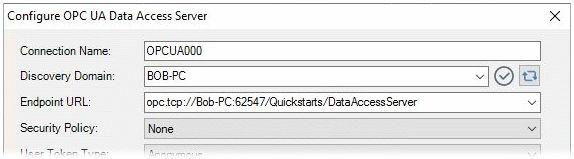
Continue configuring the connection as documented in Section 6.2, “Connect to an OPC UA server”.