16.7. Multiple States
This example compares the value of an "input" point to one of 5
possible states, and writes the value of an integer between -2
and 2 to a DataHub point named "output". The
variables in this example were defined previously in Multiple Variables.
In the HiLoAlarm template's Configuration Template window, go to the States section.
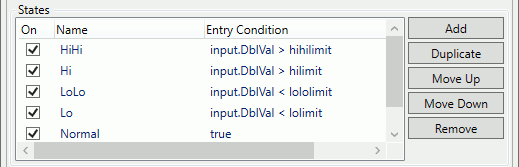
Add the following states and scripts:
On Name Entry Condition OnEntry Script Yes HiHiinput.DblVal > hihilimitapp.WritePoint(output, 2);Yes Hiinput.DblVal > hilimitapp.WritePoint(output, 1);Yes LoLoinput.DblVal < lololimitapp.WritePoint(output, -2);Yes Loinput.DblVal < lolimitapp.WritePoint(output, -1);Yes Normaltrueapp.WritePoint(output, 0);You can use the use the and buttons to rearrange the states in the list. The order is important because the states are evaluated from top to bottom. Notice, for example, that LoLo is listed before Lo, and that Normal is at the end. This causes the evaluator to first check the highs in order from most extreme to the least extreme. Then it checks the lows from most extreme to the least extreme. If none of those is true, then it returns normal, which is always true.