17.9. HTML Message Examples
Sending an HTML message is as simple as clicking the button in the Email tab. For the Message Source you can choose a file or write HTML code directly into the text-entry box. Here are two examples of how you can embed data into an HTML messages, using an ASP source file
17.9.1. An HTML Message with Embedded Data Points
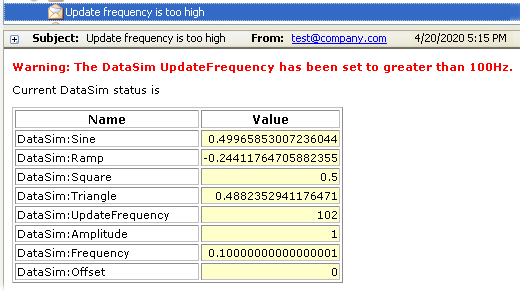
This is an example of an ASP file that embeds the latest data from DataHub points
into an HTML table. The ASP file is named EmbedPoints.asp,
and its contents are given below. If a DataHub instance is configured to send this
file as the message body, and the DataSim's UpdateFrequency is changed to, say,
102, the DataHub instance will email a message like
this:
Contents of the ASP File
<html>
<style>
BODY, P, TD{
background-color : White;
font-family :  Verdana, Geneva, Arial, Helvetica, sans-serif;
font-size : 8pt;
}
TH{
font-family:Verdana, Arial, Helvetica, sans-serif;
font-size: 9pt;
font-weight: bold;
background-color: #23cce6fe;
}
.highlight{background-color: #FFFFCC; text-align:right;}
.warning{color: #FF0000; font-weight: bold;}
</style>
<body>
<!--
	This is a simple example of an HTML template file which
        contains embedded point values from the DataHub.
 -->
<p></p>
<div class="warning">Warning: The DataSim UpdateFrequency has been
                     set to greater than 100Hz.</div>
<p></p>
Current DataSim status is
<p></p>
<table border="1">
  <tr>
    <th width="180">Name</th>
    <th width="80">Value</th>
  </tr>
  <tr>
    <td>DataSim:Sine</td>
    <td class="highlight"><%=$DataSim:Sine%></td>
  </tr>
  <tr>
    <td>DataSim:Ramp</td>
    <td class="highlight"><%=$DataSim:Ramp%></td>
  </tr>
  <tr>
    <td>DataSim:Square</td>
    <td class="highlight"><%=$DataSim:Square%></td>
  </tr>
  <tr>
    <td>DataSim:Triangle</td>
    <td class="highlight"><%=$DataSim:Triangle%></td>
  </tr>
  <tr>
    <td>DataSim:UpdateFrequency</td>
    <td class="highlight"><%=$DataSim:UpdateFrequency%></td>
  </tr>
  <tr>
    <td>DataSim:Amplitude</td>
    <td class="highlight"><%=$DataSim:Amplitude%></td>
  </tr>
  <tr>
    <td>DataSim:Frequency</td>
    <td class="highlight"><%=$DataSim:Frequency%></td>
  </tr>
  <tr>
    <td>DataSim:Offset</td>
    <td class="highlight"><%=$DataSim:Offset%></td>
  </tr>
</table>
</body>
</html>
This file consists of HTML code interspersed with Gamma code. Gamma is the scripting language of the DataHub program. The Gamma code is often used to determine the value of a DataHub point, with the following syntax:
<%=$domainname:pointname%>
The pointed brackets and percent signs (<% ... %>)
indicate to the DataHub ASP interpreter that this is Gamma code. The equals sign
(=) tells the Gamma engine to evaluate the expression,
and the dollar sign ($) tells the Gamma engine that this is
a DataHub point.