10.7. Configured Actions
A configured action will cause your query to be sent to the database, according to the trigger and any conditions you have specified. It is the end result of your configuration activities in this interface. The Configured Actions list shows the actions you have configured, and allows you to create, modify, or remove actions, as well as turn them on or off.
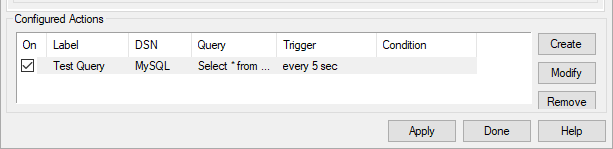
The list of configured actions shows the actions you have already configured. Selecting an existing action from the list automatically fills in the DSN, Query, Trigger, and Condition tabs with its information. Checking or unchecking the On box at the left lets you switch the action on or off.
The button creates an action for the information currently entered in the DSN, Query, Trigger, and Condition tabs. If you press the button while a configured action is selected, it creates a duplicate of that configured action and adds it to the list. This is a quick way to configure similar actions.
The button overwrites the selected configured action with the information currently entered in the DSN, Query, Trigger, and Condition tabs.
The button removes a configured action.
Once a configured action has been created or modified, the changes won't take effect until you click the or button. Each query to the database gets logged in the DataHub Script Log. This allows you to check for error messages and ensure that your query was sent successfully. You can verify the results of the query in the Data Browser.