21.4. Data Organization
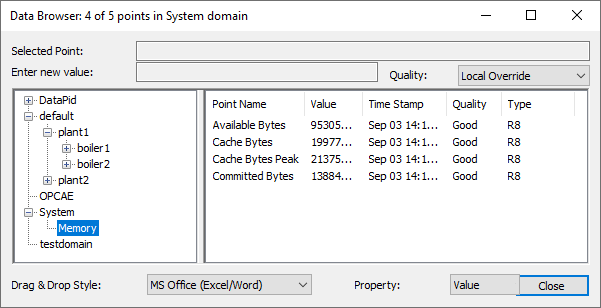
The DataHub program offers a hierarchical system to organize your data. The hierarchy is separate from the actual data. It contains points, but is not made up of data, per se. You specify the data model, similar to specifying a class in a programming language, and then you create zero or more instances of that data model. The data hierarchy can be viewed in the left-hand pane of the Data Browser window.
21.4.1. Data Domains
The highest level of the data hierarchy is the data domain. You can create as
many data domains as you need, and use them to separate data by user, function,
or any other criteria. Points in different data domains can have the same name
because each data domain creates a separate namespace. Two data domains you are
probably familiar with are default, the default data domain,
and DataSim which holds data from DataSim. All the data
domains in a DataHub instance are listed in the General option
of the Properties window.
The written syntax used by the DataHub program to denote data domains and points is:
domain:point
In many cases, this is the only level of data organization you will ever need. However, should you desire a more sophisticated way to structure your data, the DataHub program provides a way.