1.2. Launching Applications
Once the Web Application Manager is installed, you can use it to launch the Remote Config application or the WebView application. Both of these are accessed in the same way.
From the launch page, click on the button for the application you need.

The first time you run this, a dialog will ask if you want to switch to the Web Application Manager.
Click . The Web Application Manager will open, populated with the parameters required for you to connect to the remote DataHub service or instance and download the application.
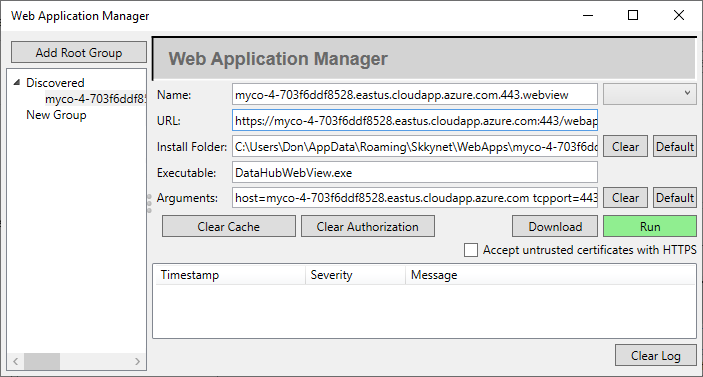
Click the green button.
The files needed to run the application will be downloaded, and a dialog window will display information about the program files, with details of the security certificate used to sign them.

![[Note]](images/note_1156523861.png)
Please see SSL Certificates in the Cogent DataHub manual for more information about SSL certificates for the DataHub program.
Check the signing certificate and affected files to determine whether or not to accept them, based on the following criteria:
If the Signing Certificate region of this dialog is not green, then the Status will be Invalid. That indicates that the certificate cannot be verified. Do not click unless you know why you are seeing a rejected certificate.
If the Signing Certificate is from an organization other than Skkynet Cloud Systems Inc. then it indicates that another company’s software has been installed on the server and is being delivered as part of the application. If you do not believe this to be legitimate, do not click .
If you click it means that you trust the app source files. They will be saved on your computer and the app will run. Your choice will be remembered, and the next time you web launch this app you will not have to accept the files again.
If, for some reason you want to revoke your acceptance of the downloaded files, you can select the profile in the Web Applications Manager and click the button.
If you click the files required to run the app will be deleted.
You will also see a list of files you just rejected and be given the chance to change your mind. To revoke your choice:
Click the button.
Click to close the dialog window.
Download the files again by clicking the green button in the Web Application Manager.
Proceed using the application as applicable for Cogent DataHub software, the Cogent DataHub service, or the WebView application.
Once you have downloaded an application, next time clicking the button or using the desktop shortcut will immediately launch it, without requiring you to download the files again.