3.11. DataHub WebView

|
DataHub WebView is a real-time data visualization tool. |
![[Important]](images/important_2051192373.png) | |
This section covers configuration parameters for the WebView application. For information about WebView and how to use it, please refer to the DataHub WebView manual. |
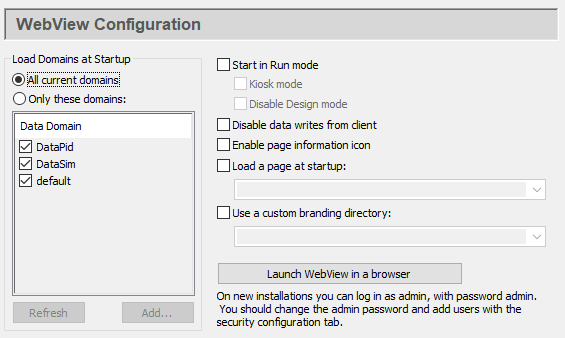
This option initializes all DataHub data domains when the WebView application starts. This is helpful in Design mode for selecting data points to bind to controls, by using auto-fill-in.
This option initializes all points in the selected domains when the WebView application starts. Data points in the unchecked domains will be loaded only when requested by a WebView client. Unchecking domains that contain large numbers of points can significantly improve page load times for users during Run mode.
- Start in Run mode
Allows you to start in Run mode, rather than Design mode, with these options:
- Kiosk mode
Presents just the working screen of the web browser, with no border, menus, URL entry field, etc. To escape from Kiosk mode (and close the browser), press Alt + F4.
- Disable Design mode
Prohibits any switch from Run mode to Design mode, whether running in Kiosk mode or normally.
- Disable data writes from client
Prevents the web client from accessing DataHub point values.
- Show page information icon
Shows or hides the page information icon.
- Load a page at startup
Allows you to specify a page that will automatically load when the WebView application starts.
- Use a custom branding folder
Allows you to specify a folder for holding custom branding information. For details, please refer to Customizing.
Provides a convenient way to start the WebView application to check this configuration.
| |
The WebView application requires the DataHub instance to be configured as a tunnelling master. Please refer to Tunnel/Mirror Master in the Cogent DataHub manual for details. |