3.22. DDE
 | The DDE option lets you configure the DataHub program to act as a DDE client and/or DDE server for DDEAdvise messages. For more information on DDE, please refer to Section 21.3.2, “DDE Protocol” and Appendix 7, DDE Overview. |
![[Note]](images/note_1156523861.png) | |
For information about connecting to Excel, please refer to Chapter 19, Excel Connections. |

DDE Client
To act as a DDE client, check the Act as a DDE client box.
![[Important]](images/important_2051192373.png) | |
For best performance, ensure that a DDE server is running when using the DataHub instance as a DDE client. A DDE client can consume substantial system resources trying to connect if a DDE server is not available. |

To add a new service or topic, press the button. To edit a service/topic, double-click it or select it and press the . To remove a service/topic, select it and press the button.
Double-click a selection, or pressing the or button opens the DDE Item Definition Window:

Here is what must be entered:
- Connection Name
A name used by the DataHub instance to identify the connection. There should be no spaces in the name. It doesn't matter what name is chosen, but it should be unique to other connection names. Each connection can have only one Service and one Topic, but it can have multiple Items.
- Service
The service name of the DDE server to this client.
- Topic
The DDE topic under which the data will be sent.
- Item Names
The DDE item name, which corresponds to a point name in the DataHub instance. If that point doesn't exist in the DataHub instance, it will be created. Enter a name for each item and press the button to add items. To remove an item, highlight it and press the button. Once all the information is entered correctly, press the button to enter the definition.
DDE Server
To have the DataHub instance act as a DDE server, check the Act as a DDE
server box. The default service name is datahub.
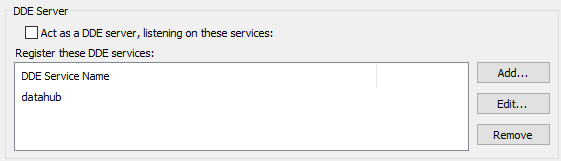
To add a DDE service name to the list, click the button and enter the name in the DDE Service Window:

To edit a DDE service name, double-click it or select it and press the . To remove a DDE service name, select it and press the button.
| |
It is currently possible to have more than one instance of the DataHub program, with one or more DDE service names in common, running on a single machine. If you plan to configure a system like this, you should ensure that each DataHub instance has unique data domain names. Otherwise, when any two of those DataHub instances are acting as servers, it is not possible to predict which one of them a given client will send data to. |
Options
These options affect both server and client behavior.

- Accept non-English characters in Excel strings (slower)
This causes Excel to send strings of Unicode characters correctly, although slower than numerical data.
- Use current locale when formatting values as strings
This will cause the DataHub instance to transmit and receive floating point values according to the current locale. For example, the value
123,456.789in a North American locale might be123.456,789in a European locale.