3.12.2. Exchange Data
Once your connection is configured, you can create topics on the MQTT broker using points from the DataHub instance, and/or request topics from the MQTT broker to create corresponding DataHub points.
Push data point to the MQTT broker
This mode allows you to select points from the DataHub data set and to transmit them to the MQTT broker. Normally you should select Convert dot to slash to allow the DataHub instance to convert point names to valid topic names. You may also choose Also subscribe to changes in the broker. This will cause the DataHub instance to listen for changes in the topics and write the results back to DataHub points. Not all brokers support subscriptions.

Choose the points from the Available Points list and they will appear in the Selected Points list. Use the button to remove a selection.
You can select groups of points or even a whole domain by using a pattern based on a regular expression. Click the button to enter a regular expression. Use the button to edit an existing expression. Every point matching the regular expression will be sent to the MQTT broker, and if more matching points are dynamically added to the domain, they will be sent as well.
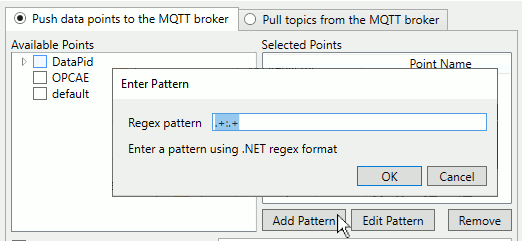
The domain portion of the point name can be a regular expression, to match
more than one data domain. For example, the expression .+:.+
matches all points in all domains. A pattern MUST include exactly one colon (
: ) character that separates the data domain from the
data point name. It must be un-escaped and not part of a capture group. If no
colon character exists in the pattern then the matching results will be
indeterminate.
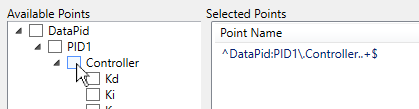
To add a regular expression based on a branch or point, hold down the Ctrl key while clicking on the checkbox.
![[Note]](images/note_1156523861.png) | |
Regular expressions are a way that programmers use place-holders and wild cards in a variable name so that it can refer to multiple names at one time. The DataHub program uses .NET Regular Expressions, whose use and syntax can be found here. |
The following options apply to all points selected:

- Add prefix segment to every topic
A string gets inserted at the beginning of the DataHub point name, before the domain name. This is useful for creating a single tree for points from different domains. For example, an entry of
MyTreehere would change a point namedDataPid:PID1.MvtoMyTree:DataPid.PID1.Mv. A point namedDataSim:Rampwould becomeMyTree:DataSim.Ramp. If the Convert slash to dot option (see below) is checked, these points would be represented on the MQTT broker asMyTree/DataPid/PID1/MvandMyTree/DataSim/Ramp.- Send all messages to this topic
If the broker you are connecting to does not expect a topic for each point, you can specify one destination topic for all points here.
- Convert slash to dot
The MQTT topics use a slash (
/) character in hierarchical names, while OPC and other industrial protocols typically use a dot (.). Keep this option checked to have the DataHub instance convert DataHub points into MQTT topics.- Automatically create point hierarchy
The MQTT protocol supports hierarchical names. Checking this option preserves the hierarchy within the DataHub instance.
- Also subscribe to changes in the broker
Allow the broker to write back to these points in the DataHub instance.
Some brokers impose certain limits on client connections. For example, cloud services like AWS and Azure limit transmission rates, message sizes and subscriptions, to avoid abuse. If you specify broker limits here, the DataHub instance will construct messages to comply with them, and will throttle subscription and publication messages to stay within those limits.

If the rate of incoming data exceeds these limits for outgoing data transmissions, the DataHub instance will buffer outgoing data for a short time, and then begin removing stale buffered data to keep the transmitted data as current as possible. See also Maximum update rate.
Click the button to save your changes, or to cancel them.
Pull topics from the MQTT broker
This mode allows you to specify topics in the broker that the DataHub instance should subscribe to. This will cause values in the broker to be written to DataHub points. You may also choose Also publish changes here to the broker. This will cause the DataHub instance to write values for the selected points back to the broker, if the broker supports this.

Click the button to enter a point in a pop-up
dialog. It will appear in the Selected Points list. Use the
button to make changes, and the
button to remove a selection. The topics
should be supplied in MQTT syntax, like this:
plant1/mixer/motor/speed. You may specify MQTT topics
with the wild cards plus ( + ) and hash (
# ).
The
+character is an internal wild card that matches any string between / delimiters. For example, you can useplant1/+/motor/speedto subscribe to all motor speeds in plant1. The topic name cannot start or end with a+.The
#character is a terminal wild card that can only appear at the end of the topic, such asplant1/mixer/#to subscribe to all topics related to plant1/mixer. You may specify a topic that is just a single#to subscribe to all topics in the broker.
The following options apply to all topics:

- Place all data points into this data domain
This is a convenient way to organize your incoming MQTT connections. Choose any existing DataHub domain, or enter a new name and a new domain will get created in the DataHub instance.
- Convert slash to dot
The MQTT protocol typically uses a slash (
/) character in hierarchical names, while OPC and other industrial protocols often use a dot (.). Checking this option lets you convert MQTT-style names.- Automatically create point hierarchy
The MQTT protocol supports hierarchical names. Checking this option preserves that hierarchy within the DataHub instance.
- Also publish changes here to the broker
Allows the DataHub instance to write values to these points in the broker.
If your broker has limits on subscriptions, messages, or topic names, you can enter them here.
Click the button to save your changes, or to cancel them.