21.4.4. Example 1: Attributes and Types
Suppose we want to create a hierarchical data model like this: We have a control system consisting of process areas, that we will call "Plants". Each plant contains 2 boilers, and each boiler has a pump and 2 valves. Each boiler measures temperature, pressure and level. Each pump measures speed, on/off state and operating temperature. There are two types of valves - a normal one that only measures position, and another that also verifies that it has power applied to it. Temperatures have a value and a high alarm limit.
The sample file plant.cfg shown below included in the
DataHub distribution will create a point hierarchy in the
default data domain that looks like this:
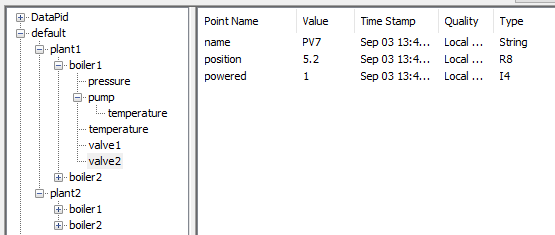
You can have a DataHub instance load this plant.cfg
configuration file on startup (see Section 1.8, “Configuration Files”).
;;; Create a generic object to share all of the common properties and
;;; attributes in the model.  Give it a common property, called "name"

(assembly default Object)
(property default Object AUTO name string rw "unnamed" 100)

;;; Create a temperature attribute to be shared by boilers and pumps.
;;; It has three properties: value,highlimit,units

(type default Temperature)
(property default Temperature AUTO value R8 rw 0 100)
(property default Temperature AUTO highlimit R8 rw 120 100)
(property default Temperature AUTO units STRING rw "C" 100)
(defaultprop default Temperature value)

;;; Create a pressure attribute for boilers.

(type default Pressure)
(property default Pressure AUTO value R8 rw 0 100)
(property default Pressure AUTO units STRING rw "kPa" 100)
(defaultprop default Pressure value)

;;; Create a plant model, sharing the properties and attributes
;;; of "object"

(assembly default Plant Object)

;;; Create a boiler model, as an "object"

(assembly default Boiler Object)
(attribute default Boiler temperature Temperature)
(attribute default Boiler pressure Pressure)

;;; Create a pump model, as an "object"

(assembly default Pump Object)
(attribute default Pump temperature Temperature)
(property default Pump AUTO speed R8 rw 0 100)
(property default Pump AUTO state I4 rw 0 100)

;;; Create a valve object.  It has a property, position, directly
;;; attached to the assembly.  We do not need an attribute unless
;;; there is more than one property to be associated with it.  In
;;; this example position has only a value, without limits or
;;; units.

(assembly default Valve Object)
(property default Valve AUTO position R8 rw 0 100)

;;; Create a specialization of a Valve that also measures whether
;;; the valve is powered.

(assembly default Powervalve Valve)
(property default Powervalve AUTO powered I4 rw 0 100)

;;; Create the hierarchy in the model

;;; Plants have two boilers, named boiler1 and boiler2
(subassembly default Plant Boiler boiler1)
(subassembly default Plant Boiler boiler2)

;;; Boilers have one Pump, named pump
(subassembly default Boiler Pump pump)

;;; Boilers have a normal valve and a powered valve, named valve1
;;; and valve2 respectively.
(subassembly default Boiler Valve valve1)
(subassembly default Boiler Powervalve valve2)

;;; Create two plants named plant1 and plant2.  These actually
;;; create the data points in the DataHub instance and arrange them
;;; in the hierarchy specified above.  Up to this point, the commands
;;; have just been building a model.  These calls instantiate the
;;; model.

(instance default plant1 Plant)
(instance default plant2 Plant)