6.3. Tunnelling - Both Firewalls Closed, with DMZ
Tunnel Scenario 5 - Data source and user firewall ports closed, using DMZ, read-only
Primary Use Securely transmit OPC UA, DA, or A&E data between secure networks, without VPNs, privately hosted (monitoring only).
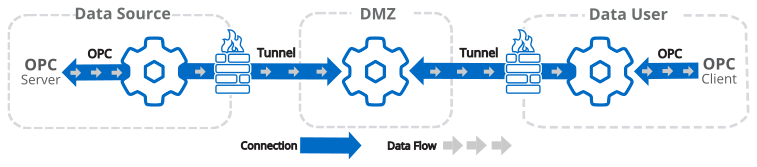
| Configuration | DMZ | Configuration | ||||||||||||
|---|---|---|---|---|---|---|---|---|---|---|---|---|---|---|
| OPC Client: Configure this DataHub instance as an OPC client to the OPC server. | OPC Server: Configure this DataHub instance as an OPC server for the OPC client. | |||||||||||||
| Tunnel Slave: Configure this DataHub instance as a Tunnel slave, so that it initiates connections. | Tunnel Master: Configure this DataHub instance as a Tunnel master, to receive connections. | Tunnel Slave: Configure this DataHub instance as a Tunnel slave, so that it initiates connections. | ||||||||||||
|
|
See also Tunnelling Security - Best Practices.
Tunnel Scenario 6 - Data source and user firewall ports closed, using DMZ, read/write
Primary Use Securely transmit OPC UA, DA, or A&E data between secure networks, without VPNs, privately hosted (monitoring and supervisory control).
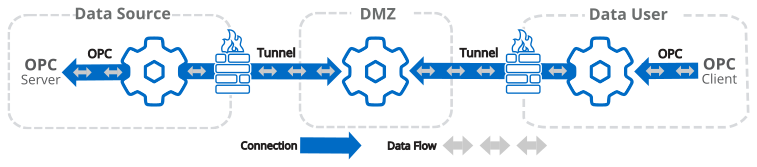
| Configuration | DMZ | Configuration | ||||||||||||
|---|---|---|---|---|---|---|---|---|---|---|---|---|---|---|
| OPC Client: Configure this DataHub instance as an OPC client to the OPC server. | OPC Server: Configure this DataHub instance as an OPC server for the OPC client. | |||||||||||||
| Tunnel Slave: Configure this DataHub instance as a Tunnel slave, so that it initiates connections. | Tunnel Master: Configure this DataHub instance as a Tunnel master, to receive connections. | Tunnel Slave: Configure this DataHub instance as a Tunnel slave, so that it initiates connections. | ||||||||||||
|
|
See also Tunnelling Security - Best Practices.