4.8.2. Configuring a Local DataHub Instance
When a DataHub instance is running as a Windows Service, you can use the Remote Config program to interact with it, without having to stop the service. You can reconfigure the DataHub instance, add new connections or view data and Event Log messages using the Remote Config program.
Here is how to start up the Remote Config program to interact with a DataHub instance while it is running as a Windows service on the same computer:
From the Start menu, go to the Cogent programs and select the Remote Config program.

This will open the Remote Config program interface.
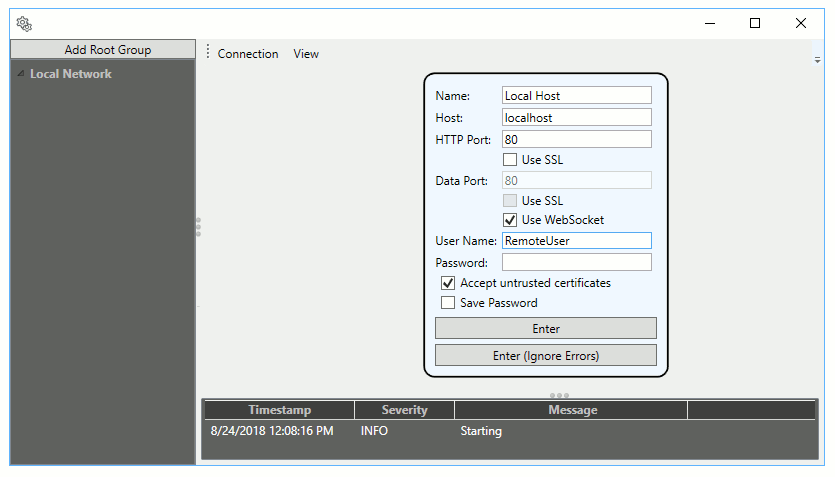
Enter the following information
- Name
A name for this connection, any text string.
- Host
The URL or machine name of the computer where the DataHub instance is running.
- HTTP Port
This port is used to exchange configuration data between the Remote Config program and the DataHub instance, via the DataHub Web Server. Use port
80for plain text, unless you have changed the default settings on your Web Server. Entries here may need to be correlated with entries for the Data Port. See the table below for more details.![[Important]](images/important_2051192373.png)
When configuring the DataHub Web Server, you must ensure that the port you configure is not in use. Please see Section 12.2, “Configuring the DataHub Web Server” for more information.
![[Note]](images/note_1156523861.png)
You do not need a Web Server license on a DataHub instance to connect the rcf; program.
- Data Port
This port is used for passing data between the DataHub instance and the Remote Config program. The default and recommended setting is to make a WebSocket connection, which will use the same port as you choose for HTTP. You must use a WebSocket connection for the data port if your DataHub license does not enable the Tunnel/Mirror feature. Here are some of the possible HTTP and data port combinations.
HTTP Type - with - Data Type HTTP Port Data Port Plain text - with - Plain text configure 80, no SSL4502, no SSL, no WebSocketPlain text - with - WebSocket configure 80, no SSL80, use WebSocketSSL - with - SSL, no WebSocket configure 4503, use SSL4503, use SSL, no WebSocketSSL - with - SSL and WebSocket configure 443, use SSL443, use SSL and WebSocket- User Name
A name for a DataHub user that has administrative permissions (see Preparation for details).
- Password
The password for that user. Use the option to avoid re-entering it each time.
- Accept untrusted certificates
Checking this box allows the Remote Config program to attempt a connection with a DataHub instance that may be using certificates for secure connections, such as the OPC UA server feature.
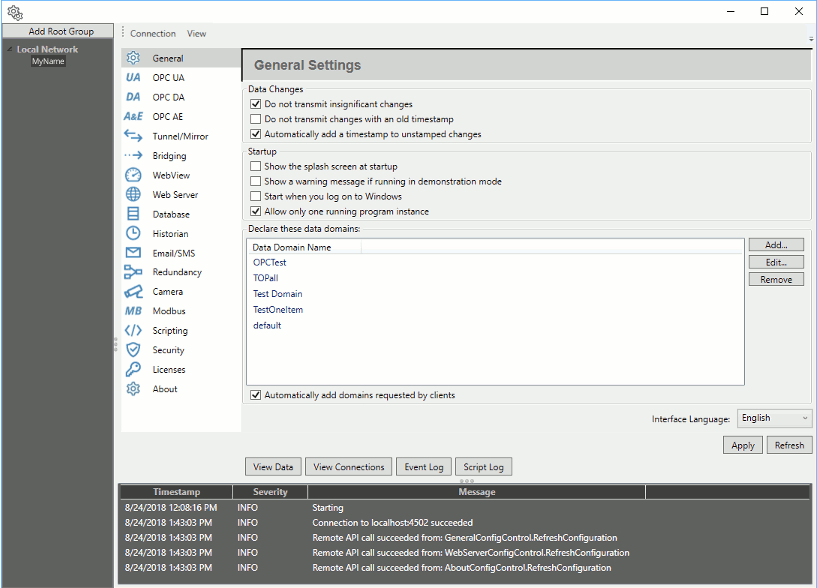
Press the button to make the connection. You should now see a remote configuration version of the DataHub Properties window:
Please refer to the Remote Config chapter of the Cogent DataHub software manual for more information about the Remote Config application.