7.13. Troubleshooting
7.13.1. Endpoint URLs
What if the LDS doesn't report back the Endpoint URLs?
Check to ensure that the LDS is running on the server.
Check that all firewalls between client and server are allowing access to the LDS port.
Look in the DataHub Event Log for any messages like this that show you the port number of the LDS you are trying to connect to:
UA Client: Could not fetch servers from url:
http://myPC:52601/UADiscovery.
On the UA server, check the firewall rule. Look for OPC UA Local Discovery Server and make sure it is allowing Inbound connections on that port number and that the firewall rule is set to allow all Profiles (Domain, Private and Public).
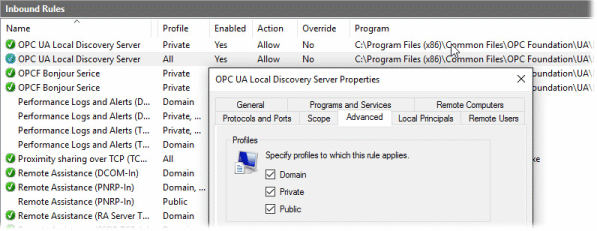
If you can't change anything, then you need to resolve this by typing in the Endpoint URL manually.
How do I know what the Endpoint URL is for the UA server?
The syntax for an endpoint URL is as follows:
Protocol://ComputerName:PortNumber/EndpointName
ProtocolDefined by the UA Server. The client may only connect using one of the protocols offered by the server. The OPC UA protocols are represented in endpoints as follows:
TCP -
opc.tcpHTTP -
httpHTTPS -
https
ComputerNameThe network name, IP address or fully qualified domain name of the computer you are trying to reach. It is dependent on the client-side computer.
PortNumberUsually defined by the UA Server, though you may need to change it if your network connection includes a NAT that is remapping the IP address of the UA Server.
EndpointNameDefined by the UA Server.
Examples:
opc.tcp://My-PC:4840/MyComputer/MyUAServer
http://AcmeServer:52601/UADiscovery
https://175.252.04.21:443/Rsources/TargetUAServer
Please see Section 7.4, “Endpoints and Discovery” for more information.