13.4.4. Publish Formats
Some MQTT devices can both transmit (publish) and receive (subscribe) data, providing a level of control over the device via MQTT messages. The format of the messages sent to the device is often very different from the format of messages that the device publishes. In some cases, the device may expect a different message format for different topics to which it subscribes.
Most MQTT topics published by a device are used only for transmission from the device, and not for receipt of commands or data from other sources. If the device subscribes to some topics, they are usually different from the topics to which it publishes. An MQTT broker communicating with that device must know the names of the topics to which the device publishes, and the names of the topics to which the device subscribes. Since the device does not publish data on the subscribed topics, an MQTT broker cannot identify those topics by their traffic. Instead, the MQTT broker must know how to form the topics to which the device subscribes based on some a-priori knowledge. The DataHub advanced MQTT parser provides a method for scripting this knowledge.
The DataHub advanced formatting mechanism supports multiple publish formats for a single receive format. The receive format implicitly identifies the type of device by matching a message to a JSON schema. Associating multiple publish formats with that device type accommodates the possibility that the device requires different publish formats for different topics.
Messages are published by the DataHub MQTT Broker or Client based on changes to
data point values. The advanced message format must specify which data points
will be mapped to which MQTT topics and publish formats to automatically publish
the correct message to the correct topic when the relevant value changes. This
is done by calling the app.RegisterPoint() function within
the app.TopicInitialization() function defined by the
system integrator. One of the arguments to
app.RegisterPoint() is the label of a publish format.
Another argument is the data point name, which must be constructed from the
incoming topic, or from the payload of the incoming message. A third argument is
the topic on which to publish a message. Once
app.RegisterPoint() has been called, the DataHub engine
will build a message and publish it on the specified topic whenever the point
value changes.
Publish formats are specified using an ASP document specification. This is a simple format that combines literal text with scripting to create a primarily static document with some dynamic content. This can be used to create any text document, though in MQTT it is primarily used to create JSON messages.
If you select a publish format as the default by checking the associated check box, that format will be used whenever a value change occurs on a point that is associated with this topic, and for which no explicit publish format is specified.
Specifying ASP Documents
An ASP document is a primarily static document with script snippets embedded within it using a special syntax:
<%=expression%>(With an=sign) Evaluates the expression and inserts the result as a string into the output document, replacing all characters from the opening<%=to the closing%>. The expression is not a complete statement and must not end with a semicolon character or other statement completion syntax. For example,3 + 2is an expression.x = 3 + 2;is a statement.<%statement or fragment%>(Without an=sign) Evaluates the statements within the delimiters, and deletes all characters in the output document from the opening<%to the closing%>. The code within the delimiters does not need to be a complete statement. A single statement could be split across multiple occurrences of the<% %>pair. This allows you to, for example, create a loop that mixes literal text with computed values by breaking the opening and closing braces of the loop body across multiple<% %>regions. The concatenation of all statements and statement fragments must form a syntactically correct script.All other characters All characters, including white space, not contained within
<%= %>or<% %>pairs are treated as literal text and simply copied to the output document.
When an ASP document is evaluated, all code within the special delimiters is evaluated to construct the output document. This document is then published to the MQTT topic associated with the data point whose value has changed.
When an ASP document is being evaluated, the following variables and functions are available, in addition to many standard C# classes and methods:
appThis is an object that supplies methods and data members, described in the Receive Format section above.pathDataThis is an object that supplies information about the topic to which this message will be published. It provides the following members:pathData.JsonPathA JSON element path associated with this topic and point. This is the path supplied as the second argument toapp.RegisterPointwhen this association was made.pathData.PointNameThe name of the point that triggered this publication.pathData.TopicThe topic on which to publish this message.pathData.AspPublishNameThe name of the publish format currently being evaluated.pathData.FullTopicThe concatenation ofTopic+“/”+JsonPath.
pointTheDataPointthat triggered this publication.
Testing a Publish Format
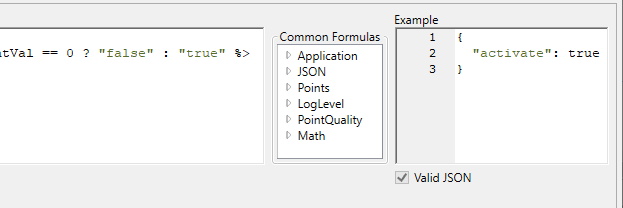
As you type into the ASP document editor, your documents will be periodically evaluated using synthetic data in place of actual names and values. The result of that evaluation will be displayed in the Example panel. If the result is a valid JSON document, the check-box will become checked.